Practical guide
Prepare an image file for the check you need
Start with the file you actually have. A small screenshot, an original photo and a renamed download can require different checks; none of those roles should be inferred from a filename alone.
18 October 2026 · Check AI Free
Preserve the source and identify its container
Step 1
Keep the received file unchanged
Save a private original before renaming or exporting a working copy. If the source matters, retain the download/source context and optionally compute SHA-256. A hash identifies those bytes without authenticating the sender.
Step 2
Check format before relying on the suffix
Read the file in Image file type checker. A .jpg extension on PNG bytes is a label mismatch; a damaged PNG is a structural failure; a recognized unsupported signature needs another reader. Do not try to convert an unsupported original by changing its suffix.
Step 3
Check encoded and EXIF-oriented display dimensions
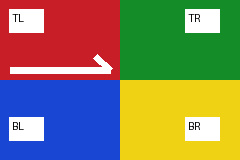
Open Image dimensions checker. Try EXIF orientation 6 dimensions reads the own JPEG as encoded 240 × 160 and display 160 × 240. Its area remains 38,400 pixels. A missing orientation uses the encoded direction, while invalid or conflicting orientation leaves display dimensions unknown.
Apply the next tool's stated limits
Enter positive whole-number maximum width, height and/or file bytes, then Check maximum limits. Width and height use safe EXIF-oriented display dimensions. Blank conditions remain unset; they do not become zero. With the orientation-6 JPEG, maximum width 160 and height 240 pass; maximum width 159 fails. The tool reports those conditions without resizing anything.
Local file readers generally allow 20 MiB. Pixel-decoding tools additionally require no more than 16 million pixels and 8192 pixels per side. Header-only dimensions can still be read for a larger image, but this does not authorize decoding it in a constrained tool. The synthetic large-header control declares 5000 × 5000 while retaining a small PNG stream: it exercises the pre-decode boundary and is not a real 25-megapixel photograph.
- Download the deliberate large-header boundary control — A source-defined patched IHDR with valid CRC; compressed samples are not claimed to match the declared canvas. The pixel tool must stop before decoding.

Do not confuse a known screenshot with an unknown PNG
The historical P01 experiment preserved an authorized 2169 × 1329 JPEG, then captured its displayed view in Chromium at 800 × 600 CSS pixels, device-pixel ratio 1, on white. A fresh local header read confirms the actual screenshot is an 800 × 600 PNG with zero entries in the supported metadata reader; the original has 76 supported entries. It is a known screenshot because its process and source were recorded.
That local experiment does not prove what a social platform does, and it does not establish that every PNG without camera fields is a screenshot. For your own file, ask for the original download or camera export when history is unknown. A screenshot records a rendered view; renaming it cannot restore missing camera fields, original dimensions, prompts or a removed credential store.
- The fixed original, re-encode and screenshot experiment — Eight licensed Commons photographs and specified local transforms. Its historical 800 × 600 Chromium captures are known screenshots because the capture process was recorded, not because they use PNG.
Choose the next operation from the evidence needed
| Need | Next action | Keep the limitation |
|---|---|---|
| Stored camera/GPS/date or prompt fields | Use the relevant local metadata or PNG reader | Missing supported fields are not an origin verdict or recovery operation. |
| Exact file identity or duplicate copies | Use SHA-256 and exact duplicate grouping | File-byte identity is separate from visual or provenance questions. |
| A changed pixel under defined decode conditions | Use Compare image files | Native-size sRGB RGBA; orientation/alpha/profile rules and decoder limits apply. |
| Embedded credential reading | Use the C2PA checker and retain status/report | This site does not verify signatures, trust or pixel binding. |
| An optional image-model reading | Read the main checker's current method and upload policy first | Local file tools do not secretly invoke the model or promise a definitive origin result. |
- Read actual stored fields — Keep source groups, warnings and raw typed values with exports.
- Compare full native decoded images — Different dimensions remain not-comparable rather than being resized.
- Read the optional model method and limits — The separate main checker can send header data and a reduced image copy; local file checks do not.
Sources and reproducible inputs
- Download the original synthetic RGBA PNG — Project-authored 8 × 6 PNG, 338 bytes. Four colored regions, alpha controls and one Description tEXt field: Fictional metadata; pixel samples are unchanged. This canonical download differs from the separate 266-byte built-in hash sample.
- Self-authored JPEG reference — Generated 240 × 160 chart, not a camera capture.
- The fixed original, re-encode and screenshot experiment — Eight licensed Commons photographs and specified local transforms. Its historical 800 × 600 Chromium captures are known screenshots because the capture process was recorded, not because they use PNG.
- W3C PNG Third Edition, 24 June 2025 — Fixed primary specification for the PNG signature, chunks, CRC, image dimensions, alpha and embedded metadata. A subset structure check does not certify full conformance.
- CIPA Exif 2.3 corrected reference, 2012 — Fixed primary reference for the Orientation tag and encoded image organization. The tools' supported fields are narrower than the complete standard; this is not a claim that 2.3 is the current Exif edition.

Continue with your file
- Resolve a misleading suffix — Signature, structural status and browser MIME remain separate observations.
- Choose a file-check workflow — Format and limits first; identity or decoded comparisons next.