Practical guide
Extract and check the real JPEG thumbnail stored in EXIF
A small preview made from the main photo is different from a thumbnail already stored inside the file. Extract the original IFD1 JPEG range and inspect it independently, including the case where it shows different content.
18 October 2026 · Check AI Free
Know which thumbnail this tool extracts
The extractor supports JPEG files up to 20 MiB with an embedded JPEG thumbnail referenced by TIFF IFD1. The relevant offset and byte-length fields are JPEGInterchangeFormat and JPEGInterchangeFormatLength. The linked fixed CIPA reference documents these fields. Uncompressed TIFF thumbnails and other preview formats are outside this release.
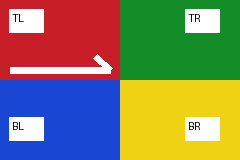
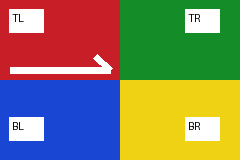
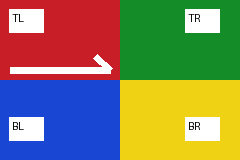
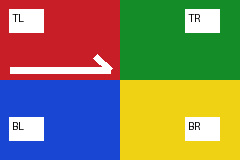
The self-authored example makes the distinction visible: its main image is a 240 × 160 colored corner chart, while the separately encoded thumbnail is a purple 48 × 32 image labeled THUMB. It is intentionally not a miniature of the chart. This demonstrates the possibility of differing stored content without claiming that a real photograph has been manipulated.
- CIPA Exif 2.3 corrected reference: JPEG thumbnail storage — The fixed published reference describes compressed thumbnails in the first IFD and their offset/length fields. These are the supported thumbnail fields, not a claim of full-standard conformance.
- Download the JPEG with a separate thumbnail — The main chart and the purple thumbnail are both project-authored.
Extract the original embedded bytes
Step 1
Run the known thumbnail example
Open the extractor and click Try embedded thumbnail, or choose thumbnail.jpg. Wait for Original embedded JPEG bytes extracted locally. The tool does not resize the main image to create this result.
Step 2
Read dimensions and source range
The result shows JPEG APP1 EXIF 1, IFD1; encoded size 48 × 32; TIFF offset 300; length 1193 bytes. The offset begins at this EXIF TIFF header, not the outer JPEG file's first byte. The extraction checks the range inside its owning container.
Step 3
Inspect the preview as a separate image
Confirm that the thumbnail is purple and labeled THUMB rather than assuming it matches the main corner chart. A thumbnail can be older or otherwise different; the extractor reports what it contains without deciding the editing history or authenticity.
Step 4
Download and reopen the thumbnail
Click Download original thumbnail. The file is embedded-thumbnail-1.jpg. Open it independently and verify 48 × 32 encoded pixels. The extracted bytes are the referenced JPEG bitstream; the source photo is unchanged.
Run the absent and damaged controls
| Button / file | Expected outcome | What is not generated |
|---|---|---|
| Try no thumbnail / thumbnail-absent.jpg | No supported IFD1 JPEG thumbnail present; empty | No shrunken main-image substitute |
| Try broken offset / thumbnail-broken.jpg | Unreadable thumbnail; range/limit warning | No out-of-bounds extraction and no successful download |
| Try embedded thumbnail / thumbnail.jpg | read; one 48 × 32 JPEG, 1193 bytes | No newly encoded thumbnail |
- Download the no-thumbnail control — Valid JPEG and other EXIF can remain even when IFD1 JPEG thumbnail storage is absent.
- Download the broken-offset control — An intentionally invalid TIFF thumbnail reference, not a successful empty extraction.
Use the result in a privacy or editing review
Inspecting the main image alone does not inventory the other stored images in a file. If an editing or privacy workflow requires removing an obsolete thumbnail, choose a supported operation that removes its EXIF container or intentionally rebuilds a limited camera record, then run the extractor again on the actual output.
Removing whole EXIF also removes other fields and can affect orientation. The GPS-specific JPEG rebuilding policy discards thumbnails as part of its documented policy. Neither operation retracts earlier copies or establishes that no identifying content remains in pixels or custom storage.
A malformed outer JPEG, unsupported input, a duplicated or invalid thumbnail reference, excessive dimensions or an invalid embedded JPEG does not become a generated fallback. Preserve the warning and obtain an intact original if that embedded preview matters.
- Choose an EXIF removal policy — Read the category impacts and recheck the downloaded copy.
- Use the limited JPEG camera rebuilding policy — The allowlist excludes thumbnails, MakerNote and unknown fields.
Sources and reproducible inputs
- Download the self-authored camera example — A 240 × 160 labeled corner chart, invented EXIF dates and a separately encoded 48 × 32 purple thumbnail. Camera fixtures v1; not a camera photograph.
- CIPA Exif 2.3 corrected reference: JPEG thumbnail storage — The fixed published reference describes compressed thumbnails in the first IFD and their offset/length fields. These are the supported thumbnail fields, not a claim of full-standard conformance.
Continue with your file
- Create an orientation-normalized display copy — That Canvas output also omits the source thumbnail and metadata.
- Check sharing privacy beyond the thumbnail — Review supported fields and visible image content separately.
- Choose another photo metadata task — Dates, orientation, batch reports and exact field exports.